Remote Employee Monitoring Software: How It Helps Teams Stay Productive and Secure

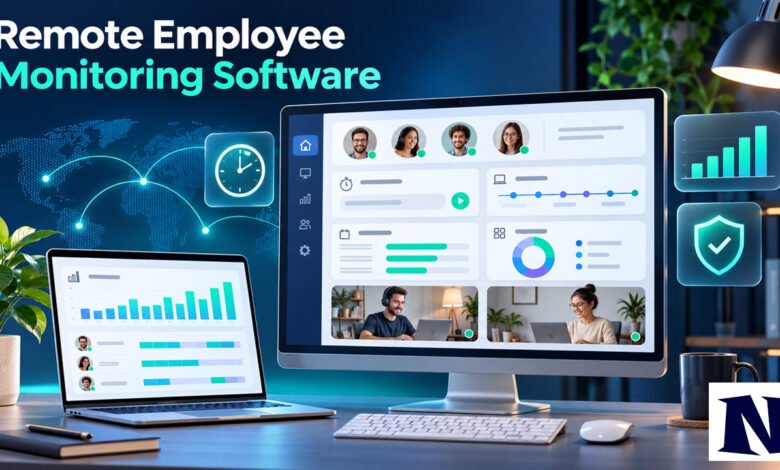
Remote employee monitoring software gives managers clear visibility into how distributed teams spend their work hours. It tracks activity, time, applications, and websites on company devices so businesses can measure productivity, protect data, and manage projects without constant meetings. Many companies adopted these tools after the rise of remote and hybrid work, and they remain common in 2026 for teams that need reliable insights across locations.
The software answers practical questions: Is work getting done? Are company resources used correctly? Can managers support overloaded team members before burnout sets in? When used with clear policies and transparency, it supports accountability while reducing guesswork. Results depend on the specific tool, company culture, and how openly leaders communicate the purpose.
What Is Remote Employee Monitoring Software?
Remote employee monitoring software is a category of tools that record how employees use company devices and accounts during work hours. It focuses on activity levels, app and website usage, attendance, and sometimes screenshots or screen recordings. The goal is usually to improve productivity, verify billable hours, or safeguard sensitive information rather than watch personal activity.
These tools run on company-owned computers or approved devices. They typically operate only while employees are clocked in or during scheduled work time. Many modern platforms emphasize analytics over constant surveillance. They produce reports on focus time, project progress, and workload balance. Not every tool logs keystrokes or captures full screens; some stick to activity percentages and application lists.
Businesses use this software because remote work removes the informal visibility of an office. Managers cannot see who is focused or who needs help. The software fills that gap with data. It does not replace good management, but it supplies facts that support better decisions. Pricing in recent comparisons often starts around $5 to $15 per user per month depending on features and billing cycle.
Key Features of Remote Employee Monitoring Software
Core features include automatic time tracking that separates active and idle time. The software notes which applications and websites employees use and how long they spend in each. Activity scores often show percentage of productive time based on mouse, keyboard, or app usage patterns. Optional screenshots capture the screen at set intervals as proof of work.
Many tools add project and task tracking so hours link to specific clients or jobs. Productivity reports highlight trends over days or weeks. Alerts can flag unusual behavior, such as sudden drops in activity or access to restricted sites. Some platforms include GPS for field teams or data-loss prevention rules that block sensitive files from leaving the network.
Privacy controls vary. Certain tools let employees pause tracking during breaks or view their own data. Others offer blurred screenshots or no keystroke logging at all. Integration with payroll, project management, or invoicing systems is common. Exact capabilities differ by vendor, so teams should review current feature lists before choosing.
Benefits of Using Remote Employee Monitoring Software
One clear benefit is better visibility without micromanaging. Managers see real patterns instead of relying on self-reports. This helps allocate work more fairly and identify who is overloaded. Accurate time data also supports client billing and reduces disputes over hours.
Security improves when tools detect risky behavior early. Companies handling confidential data can spot unauthorized access or potential data leaks faster. Productivity often rises because clear expectations and feedback loops encourage focus. Teams that combine monitoring with coaching report stronger results than those that use it only for oversight.
Cost savings appear through reduced time theft and better project estimates. Remote teams can also prove compliance during audits. These gains are not automatic. They depend on fair implementation and employee buy-in. When trust is low, the same data can create resentment instead of improvement.
How Remote Employee Monitoring Software Works
The process starts with installation of a lightweight agent on company devices. Employees usually receive notice and, in many places, must acknowledge the monitoring. Once active, the agent records activity only during work sessions. Data flows to a central dashboard that managers and sometimes employees can view.
Reports update in near real time or on a schedule. Managers filter by team, project, or individual. They can export timesheets or set goals for productivity scores. Some systems use rules to classify apps as productive or distracting based on the company’s needs. Screenshots, when enabled, arrive at chosen intervals and can be blurred or limited.
Data stays on company-controlled systems or secure clouds. Access is role-based so only authorized people see details. Regular reviews of the collected information help teams adjust policies. The software itself does not make decisions; people interpret the reports and act on them.
Popular Remote Employee Monitoring Software Tools
Several tools appear frequently in 2026 comparisons. Insightful focuses on productivity analytics for distributed teams and starts near $8 per user per month with optional screenshots. ActivTrak offers workforce analytics, often without keystroke logging, and includes a free plan for small teams. Hubstaff combines time tracking with light activity monitoring and is popular for agencies that need client billing features; prices begin around $5 per user monthly.
DeskTime provides automatic tracking at a lower entry price and limits screenshots to higher plans. Teramind emphasizes security and data-loss prevention with deeper monitoring options and higher starting costs. Clockify and similar time trackers suit teams that prefer lighter oversight. Each tool differs in invasiveness, pricing, and free tiers. Current details should be confirmed on vendor sites because plans change.
Teams should match the tool to their main goal. Productivity coaching pairs well with analytics platforms. Security needs favor stronger monitoring suites. Budget and team size also matter. Free or low-cost plans exist for small groups, while larger organizations often negotiate custom packages.
Legal and Privacy Considerations for Remote Employee Monitoring Software
In the United States, monitoring company-owned devices is generally allowed for legitimate business reasons under federal law. Several states add notice requirements. New York, Connecticut, Delaware, and others expect written notice or employee acknowledgment before electronic monitoring begins. Covert monitoring can create legal risk.
Under GDPR and UK GDPR, monitoring must be necessary, proportionate, and transparent. Companies need a lawful basis, usually legitimate interests, and must inform workers clearly. Data minimization is required, so tools that capture only work-related activity fit better. Many countries ban or restrict webcam monitoring in home settings.
Best practice is to provide written policies, limit monitoring to work hours and company devices, and avoid personal data. Employees should know what is collected and why. Consulting local counsel is wise because rules vary by location and change over time. Transparent use reduces both legal exposure and employee concerns.
Best Practices for Implementing Remote Employee Monitoring Software
Start with a clear written policy that explains the purpose, what is tracked, and how data will be used. Share it before rollout and obtain acknowledgment where required. Choose the least invasive tool that still answers your management questions. Avoid keystroke logging or constant screen recording unless security needs truly demand it.
Involve employees early. Let them see their own reports when possible. Use the data for coaching and workload balance, not only for discipline. Set expectations around response times and focus, then review results together. Limit access to sensitive reports and delete data after a reasonable retention period.
Train managers on fair interpretation. Activity scores do not equal performance. Combine monitoring insights with outcome metrics such as completed tasks or client feedback. Regular policy reviews keep the system aligned with culture and law. These steps help the software support productivity instead of eroding trust.
Pros and Cons of Remote Employee Monitoring Software
Pros include accurate time records, early detection of security issues, and data that supports fair workload distribution. Managers gain objective information that improves planning and reduces unnecessary meetings. Client billing becomes more precise. Teams can identify training needs or process bottlenecks faster.
Cons include potential loss of trust if employees feel watched without purpose. Overly detailed tracking can create anxiety and lower morale. Setup and ongoing policy work take time. Legal risks rise if notice rules are ignored or personal devices are monitored without consent. Costs add up for large teams, and data storage must be handled carefully.
The balance tips positive when leaders prioritize transparency and use results to help people rather than control them. Many organizations find moderate monitoring sufficient. Extreme surveillance often produces weaker long-term results.
Conclusion
Remote employee monitoring software fills the visibility gap created by distributed work. It supplies practical data on time, activity, and security so managers can support teams more effectively. Success depends less on the software itself and more on clear policies, open communication, and a focus on outcomes over constant observation.
Companies that choose tools matching their real needs, respect privacy rules, and treat employees as partners usually see better results. The technology continues to evolve with stronger analytics and lighter tracking options. Used thoughtfully, it helps remote teams stay productive, secure, and aligned without unnecessary friction.
Frequently Asked Questions
What is remote employee monitoring software?
It is software that tracks activity, time, applications, and websites on company devices used by remote or hybrid workers. The main purpose is to measure productivity, verify hours, and protect company data during work time.
Is remote employee monitoring software legal?
In most places it is legal on company-owned devices for business reasons, but many regions require advance notice to employees. Rules differ by country and state, so companies should check local requirements and provide clear policies.
Does remote employee monitoring software track personal activity?
Most tools are designed to track only during work hours on company devices. Good implementations avoid personal files, webcams, or after-hours monitoring. Employees should confirm the exact settings with their employer.
What are the main benefits for remote teams?
Benefits include accurate time tracking for billing, better workload visibility, early security alerts, and data that supports fair management decisions. Results improve when the software is paired with transparent communication.
How much does remote employee monitoring software cost?
Typical pricing starts between roughly $5 and $15 per user per month depending on features, with free plans or trials available for some tools. Exact costs vary by vendor, team size, and billing cycle and should be verified directly.
See more amazing Information visit Novira Magazine