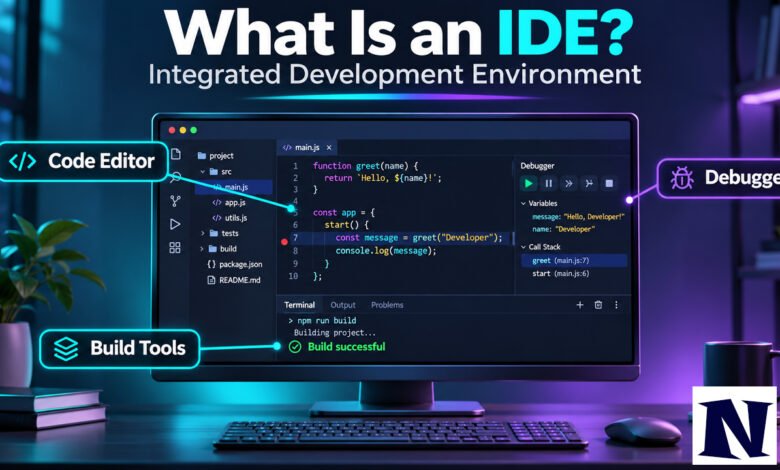
What Is an IDE An Integrated Development Environment, or IDE, is a software application that brings together the main tools programmers need in one place. Instead of switching between separate programs to write code, compile it, and fix errors, developers work inside a single interface. This setup helps them write software faster and with fewer mistakes.
Most people who search for this term want a straightforward explanation. An IDE typically includes a code editor, tools to build or run the program, and a debugger. Many also add version control, project management, and language-specific help such as automatic code completion. You can write code in a plain text editor, but an IDE reduces the manual work that comes with that approach.
What Is an IDE?
An IDE is software designed for creating computer programs. It packages several development tools into one graphical user interface so programmers do not have to manage them separately. At a minimum, it usually offers a source code editor, build automation, and debugging. Some IDEs also include a compiler or interpreter, depending on the language they support.
The idea is simple: keep the workflow in one window. A developer can open a project, write or edit code, run the program, and check for errors without leaving the application. This consistency makes the process smoother than using individual command-line tools or basic editors for each step. IDEs are used for everything from small scripts to large applications across many programming languages.
History of IDEs
Early programming relied on punched cards or simple text files with no feedback until the code was submitted to a separate compiler. The first system that combined editing, compilation, and execution in one environment was Dartmouth BASIC in 1964. It worked through a time-sharing system and allowed interactive use, which was new at the time.
Maestro I, developed by Softlab Munich in the 1970s, is often called the first true commercial IDE. It was used by thousands of programmers and remained influential for years. In the 1980s, products like Borland’s Turbo Pascal brought the concept to personal computers. It let developers write, compile, and debug without switching applications. Microsoft’s Visual Basic in 1991 added visual tools for building user interfaces, and Visual Studio later unified many of Microsoft’s development tools. Open-source options such as Eclipse arrived in the early 2000s and gave developers free, extensible alternatives.
Core Features of an IDE
A typical IDE centers on a few essential parts. The code editor supports syntax highlighting so different elements of the code appear in different colors, making the structure easier to read. It often includes auto-completion that suggests functions or variables as you type, and it can underline errors before you run the program.
Build tools handle compiling or interpreting the code and packaging it into something that can run. The debugger lets you pause the program, step through lines one by one, and inspect variable values to find problems. Many IDEs also integrate version control so you can track changes, and some offer project browsers that show files and classes in an organized tree. Language support varies: some IDEs focus on one language, while others handle several through plugins or built-in features.
Types of IDEs
IDEs fall into a few broad groups. Language-specific IDEs are built around one main language and offer deep support for its rules and libraries. Examples include PyCharm for Python or Android Studio for Android development. Multi-language or general-purpose IDEs work across several languages. Visual Studio Code and Eclipse are common in this category because they can be extended with plugins.
Platform-focused IDEs target a particular operating system or device. Xcode is required for native Apple development, while Visual Studio has long been associated with Windows and .NET work. There are also cloud IDEs that run in a browser, so you do not need to install software locally. These have become more practical as internet connections improved and teams needed shared environments.
Popular IDEs Used by Developers
Visual Studio Code is the most widely used tool according to recent developer surveys. It is free, lightweight, and works on Windows, macOS, and Linux. With the right extensions it can handle almost any language, though it starts as a capable editor rather than a full traditional IDE. JetBrains products such as IntelliJ IDEA and PyCharm provide stronger built-in understanding of specific languages and are popular for professional work, especially Java and Python projects. They offer free community editions and paid versions with more features.
Microsoft’s full Visual Studio remains common for .NET and C++ development on Windows. Eclipse and NetBeans continue to be used in Java and academic settings. Newer options that emphasize AI assistance, such as Cursor, have gained attention by building features like code generation and multi-file edits directly into the editor. The right choice often depends on the language, team preferences, and whether free tools meet the project’s needs.
Benefits of Using an IDE
Using an IDE saves time because the common steps of development are already connected. Developers spend less effort configuring separate tools and more time writing and improving code. Real-time error detection and intelligent completion reduce simple mistakes that would otherwise appear later. Project management features keep files, dependencies, and settings organized, which helps on larger codebases.
Teams benefit from consistent setups and shared settings. Integrated testing and version control mean fewer context switches during the day. For beginners, an IDE can make the language feel more approachable by highlighting structure and offering suggestions. The main trade-off is that some IDEs use more computer resources and take longer to start than a minimal editor, but most developers find the productivity gain worthwhile once they are comfortable with the interface.
IDE vs Text Editor
A plain text editor such as Notepad or a basic terminal editor can open and save code files, but it offers little help beyond that. You still need to run a separate compiler or interpreter and use another tool to find bugs. An IDE includes those capabilities inside the same application and adds language-aware features.
Many modern editors can be extended until they feel similar to an IDE. Visual Studio Code is the clearest example: it begins as a fast editor and gains debugging, terminal access, and language servers through extensions. The practical difference often comes down to how much is available by default and how deeply the tool understands the language. Developers who prefer minimal tools still use advanced text editors like Vim or Neovim with custom configurations, while others prefer the fuller feature set of a dedicated IDE from the start.
How to Choose the Right IDE
Start with the language or languages you use most. A specialized IDE usually provides better completion, refactoring, and analysis for its main language than a general tool. Next, check operating system support. Most popular IDEs run on Windows, macOS, and Linux, but some, such as Xcode, are limited to one platform.
Consider the size and type of project. Larger professional codebases often benefit from strong refactoring tools and reliable debugging. Smaller scripts or quick experiments may not need the full weight of a traditional IDE. Budget matters too: many strong options are free or have free community editions, while paid versions add advanced analysis or support. Finally, try the tool on a real project for a few days. Personal preference for speed, interface layout, and keyboard shortcuts often decides the final choice more than feature lists alone.
Cloud IDEs and Modern Trends
Cloud IDEs let developers open a workspace in a browser without installing software on their own computer. Services such as GitHub Codespaces and similar platforms provide pre-configured environments that match a project’s requirements. This approach helps teams keep consistent setups and makes it easier to work from different devices.
Recent years have also seen AI features added to both traditional IDEs and new editors. These include code suggestions that go beyond simple completion, chat interfaces that explain code, and tools that can edit multiple files based on a description. Some newer products are built around these capabilities from the beginning. The core idea of an IDE—combining editing, building, and debugging—remains the same, but the amount of automated help available inside the environment continues to grow.
Interesting Facts About IDEs
Dartmouth BASIC in 1964 is widely regarded as the first language environment that integrated editing, compilation, and execution, even though it was command-based rather than graphical. Maestro I was installed for tens of thousands of programmers in the 1970s and 1980s and is still occasionally displayed in technology museums. Turbo Pascal became popular in part because it was relatively inexpensive and fast on the personal computers of its era. Today, survey data consistently show Visual Studio Code as the single most used development tool across platforms, largely because of its free availability and large extension ecosystem.
Conclusion
An IDE is a practical tool that gathers the essential steps of software development into one application. It includes a code editor, ways to build or run programs, and debugging support, with many additional features available depending on the product. While it is possible to write software with separate tools, most developers find that an IDE reduces friction and helps them produce better code more quickly. Choosing one comes down to the languages you use, the projects you work on, and how much built-in assistance you prefer. The landscape continues to evolve with cloud options and AI features, but the basic value of an integrated environment remains clear.
Frequently Asked Questions
What does IDE stand for?
IDE stands for Integrated Development Environment. The term refers to software that combines common programming tools into a single interface.
Do I need an IDE to learn programming?
No. You can start with a basic text editor and a command line. An IDE becomes more helpful as projects grow and you want features such as error highlighting and debugging.
Is Visual Studio Code a full IDE?
It is often described as a code editor that can function like an IDE once the right extensions are installed. Out of the box it is lighter than traditional IDEs such as IntelliJ IDEA or full Visual Studio.
Are there free IDEs?
Yes. Visual Studio Code, Eclipse, the community editions of JetBrains tools, Android Studio, and Xcode are all free to use. Some paid versions add extra analysis or support features.
Can I use an IDE in the browser?
Yes. Several cloud IDEs run entirely in a web browser and provide editing, running, and debugging capabilities without a local installation.
See more amazing Information visit Novira Magazine